
Buy the Ecomz AI source-code licence and launch the platform under your own brand and domain. Create monthly and yearly merchant subscriptions, then invite shops to join. Every paying merchant brings subscription revenue to your business; each merchant keeps the revenue from products sold in their own shop. Start with 2–3 categories and a demo for each, then grow through ads and referrals.
This guide shows what to do after buying the Ecomz AI source code: put your brand on the platform, choose your merchant plans, launch category ads and welcome paying shops. Your merchants build their own stores and sell to their own customers while you grow the subscription business under your name.
Understand the business model before you sell it
You buy the Ecomz AI source-code licence and launch a commerce platform under your own name and domain. You choose the monthly or yearly plans and sell those subscriptions to merchants. Each merchant runs an isolated shop under their own brand and sells products to that shop's customers.
A simple analogy is a shopping mall: you provide and maintain the building; independent businesses rent space and serve their own customers. Online, your 'building' is the hosted commerce platform, and each merchant has a private branded shop rather than a stall in one shared marketplace.
You set the monthly or yearly price. Merchants pay your platform for access to their shops and commerce tools, creating recurring subscription revenue as your merchant base grows. Each shop's customers buy products from that merchant, and the merchant keeps those product-sale payments. Thirty subscribed shops mean thirty active subscription payments at your chosen plan prices.
Your role: grow the platform
As the platform owner, you launch the purchased commerce platform under your own brand and domain, set merchant subscription plans and market your platform to shop owners. You provide the ecommerce infrastructure—much as Shopify or Wix provides a platform—rather than building each merchant's business. Each merchant runs and markets their own shop to its customers, receives product payments through their own provider and fulfils orders. Your business grows when more merchants subscribe and keep using the platform.
Your launch starts with three clear moves
- Put your brand on the platform.Launch your platform under your chosen business name and domain using the included setup guidance.
- Choose your merchant subscriptions.Set the monthly and yearly plans you want to sell to shops in your market.
- Show merchants what they can build.Create a demo shop for each of your first 2–3 categories, then use those demos in your ads and conversations.
How your users (merchants) join, pay and run their shops
This is the journey your merchants will follow after your branded platform goes live: discover your offer, subscribe, create a shop, serve their customers and renew. Each active subscription contributes to your recurring platform revenue.
The merchant visits your platform
They find your website through a local search, recommendation, ad or live demo, then create an account and name their shop.
They choose a monthly or yearly plan
They choose the plan that fits their shop and pay your platform through the subscription options you configure. The merchant gains access to the capabilities included in that plan, and your business receives the subscription payment.
Their private shop takes shape
They choose an industry theme, use the visual drag-and-drop builder or an AI-assisted builder, add their branding and domain, upload products, and configure policies, stock, delivery plugins and payment-provider accounts.
They attract and serve their own customers
The merchant publishes their website, markets to shoppers, receives orders and product payments into their own provider account, assigns delivery, and manages fulfilment from the web dashboard or Merchant Mobile App.
Apps and AI deepen the experience
The merchant adds a shop-specific AI employee and branded Android and iOS customer apps, giving shoppers more ways to discover products and connect with the shop.
They pay to keep their service active
As merchants use their storefront, orders, customer relationships, apps and AI employee in daily business, they have a reason to renew. Each renewal continues your subscription revenue.
In the morning they review orders and stock on their phone. During the day they add products, answer shoppers, pack orders and connect a courier. Their AI employee can answer supported product and policy questions on the website, customer app and connected social channels at any hour; the merchant can take over conversations. They, not you, run ads and customer relationships for their shop.
Start in one market with 2–3 merchant categories
Choose 2–3 categories you know in one city—for example fashion, beauty and social sellers. A focused starting point makes your demos and ads instantly relevant to the merchants you want to attract.
- Pick your first 2–3 merchant categories.Start with businesses already selling products in your city or through social channels.
- Give each category its own demo shop.Use familiar products and your market's currency so merchants can picture their own brand on your platform.
- Run matching ads and invite merchants in.Show the platform's relevant features in category-specific video, image and demonstration ads. Send each audience to its matching demo or video, show the monthly or yearly plan and guide interested merchants to subscribe.
A fashion seller taking orders in Instagram messages may already have product demand. Show them a branded catalogue with sizes and stock, a checkout using a familiar local payment provider, a courier connection, and an AI employee that answers sizing and delivery questions. The sales conversation becomes about missed orders and faster service—not software jargon.
What you sell: five superpowers for every shop
Show five connected systems that help a merchant launch, operate and grow an independent business. Package access to these capabilities in the monthly and yearly plans you choose.
A private, isolated commerce business
Every shop has its own branding, domain, products, inventory, orders, customer accounts, carts, payment settings, policies and AI knowledge. Merchants run their own daily operations in their own environment; their shoppers are not pooled across your platform.
A store and pages they can build themselves
Choose from 37+ industry theme starters and 24+ page starters, then edit sections with the visual drag-and-drop builders. The AI Theme Builder and AI Page Builder can draft from a brief; the merchant reviews, refines and publishes under their own domain.
A 24/7 AI employee for that shop
The AI employee automatically learns from the merchant's products, FAQs, policies and approved documents, so there is no manual training step. Once connected, it can keep answering questions, recommending products and guiding shoppers toward checkout on WhatsApp, Facebook Messenger, Instagram, Telegram, the storefront chat widget and the customer app. The merchant can take over a conversation or turn off AI replies and answer personally, while using their own supported AI provider key.
Branded native shopping apps for their customers
Each merchant can offer Android and iOS customer apps with their own name, icon, catalogue, cart and customer accounts. Products, designs, layouts, banners and images stay dynamically in sync with that merchant's shop. Merchants can publish their branded apps through their own Google Play and Apple developer accounts.
Local connections and full operating tools
The platform's built-in integration catalogue lists 136+ payment choices, 141+ courier connections and 81+ transactional SMS gateways. Merchants connect supported services to their own shops and receive product payments through their chosen provider. They manage stock, orders, customers, coupons, reports, delivery, SEO settings and marketing pixels from the web dashboard or Android and iOS Merchant Mobile Apps.
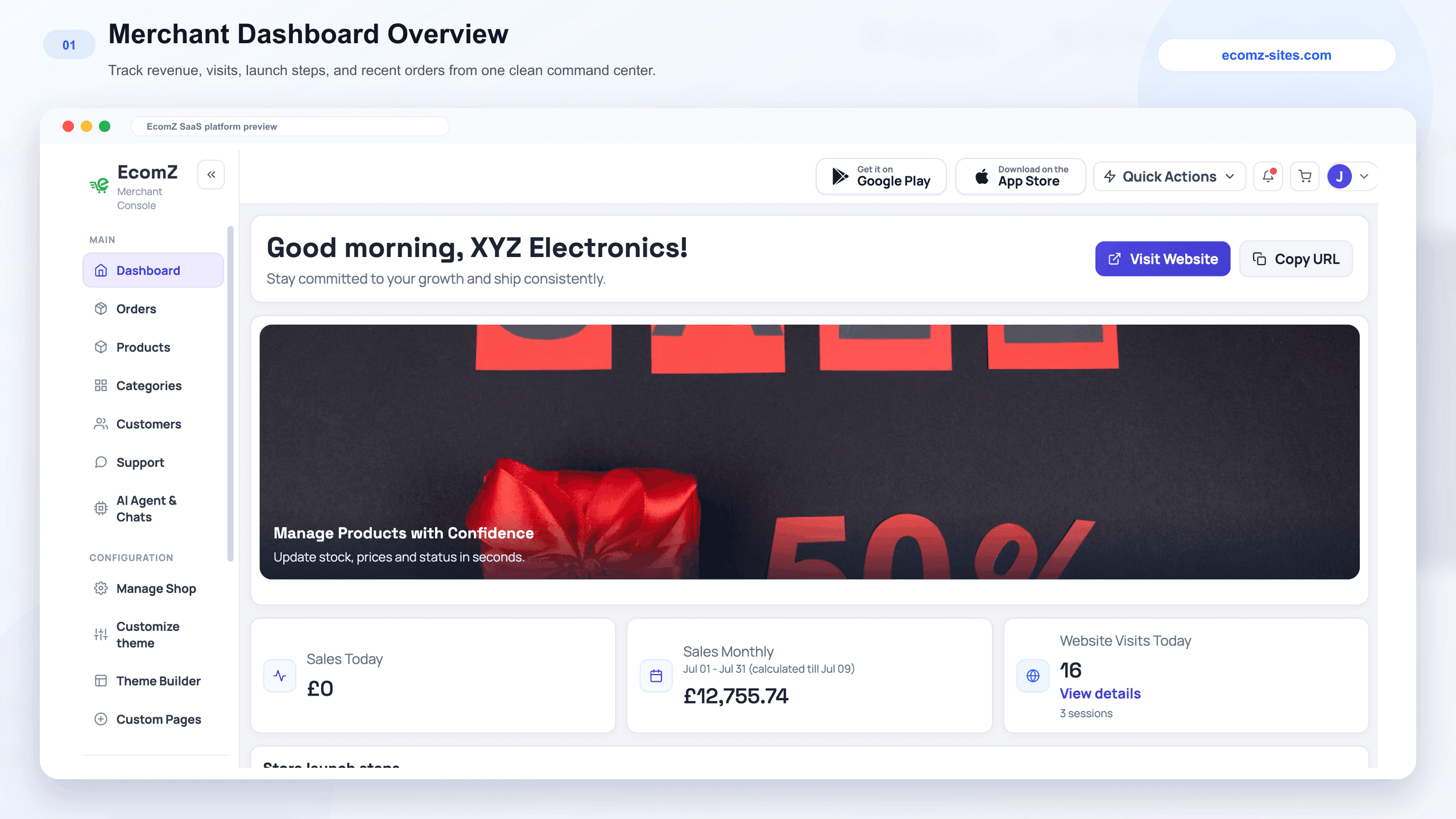
Give merchants a credible reason to choose your local platform
Your strongest offer is a complete commerce experience under the merchant's own brand: a storefront, self-service builders, local payment and delivery connections, shop-specific AI and mobile operations. Demonstrate the journey for the merchant's category so they can picture their own shop on your platform.
Five merchant-facing USPs to show, not just say
- One connected commerce workspace.Show the storefront, orders, customer accounts, discounts, analytics and built-in integrations working together inside that merchant's plan.
- A shop-trained AI employee.Ask a product question on a connected channel, show an answer grounded in that shop's information, then show how the merchant can take over in one inbox.
- A brand on the customer's phone.Show the native Android and iOS customer-app workflow alongside the separate Merchant Mobile App, so merchants can picture both the customer experience and their own daily workspace.
- Design without a developer.Open an industry theme, edit a page with drag-and-drop, and demonstrate the AI Theme Builder. Show how the merchant can review and publish the result under their own domain.
- Connections for the local market.Demonstrate supported payment, courier and SMS connections that suit your target market. Each merchant connects their own provider accounts to their shop.
Why local shops may choose your platform over Shopify, Wix or an agency
Use this comparison as a conversation guide, not a claim that every competitor lacks a feature. Show the merchant the actual tools and plan inclusions available on your platform.
| Your platform advantage | What the merchant may be comparing | What to say to the shop owner |
|---|---|---|
| All-in-one Ecomz AppStore | A collection of separate plugins and subscriptions for pixels, SEO, chat and pages. | Show which AppStore tools, marketing pixels and AI SEO features are included in your plan, then demonstrate how they connect to the shop. |
| Built-in 24/7 AI employee | A basic website still needs a way to answer incoming product questions across channels. | Show the AI employee answering from this shop's catalogue on connected WhatsApp, Instagram, Messenger, Telegram and storefront chat, plus the merchant's option to take over. |
| Own branded iOS and Android apps | A website-only offer or a separately commissioned mobile-app project. | Show the shop's own Android and iOS customer apps, with products and designs staying in sync, alongside the separate Merchant Mobile App. |
| Visual builder and 37+ themes | A template that needs extra design work before the merchant can make it their own. | Open an industry theme, change a section with drag-and-drop and show the AI-assisted builder drafting a page under the merchant's brand. |
| Local-market connections | A global setup that may need additional work to match local checkout, couriers and SMS services. | Demonstrate the supported payment gateway, courier and SMS connections your local merchants actually use, with each merchant linking their own accounts. |
“I already have a website.”
Ask whether orders, customer accounts, stock, delivery, messaging and mobile operations work together today. Show a complete order flowing from the branded storefront into the merchant dashboard and phone app.
“Why choose your platform?”
Show the merchant a branded shop, supported local gateways and couriers, one workspace for orders, a shop-specific AI employee and the path to branded native customer apps. Your platform brings these pieces together under one local brand and one subscription.
“How can I build my shop?”
Open an industry starter, change its logo and colours, use the visual builder, and show the AI Theme Builder drafting a layout from a plain-language brief. Then walk through products, payment connection and a test order.
“Who answers customers after hours?”
Show the merchant's AI employee answering a product or delivery question from the shop's own knowledge, recommending an in-stock item and handing the conversation to a person when needed.
You get your own online store, your own customers and your own product payments. We provide the platform, hosting and tools: visual store building, native shopping apps, local integrations and an AI employee that can help shoppers whenever you are away. You run the business; we keep the commerce system working.
Offer monthly or yearly merchant subscriptions
This is how your platform earns: merchants subscribe to your branded commerce platform every month or every year. You choose the plan prices and the capabilities included in each plan, then grow recurring subscription revenue as more merchants join and renew.
Monthly subscription
A merchant chooses your monthly plan and gets access to the shop capabilities included in it. Each active monthly subscription creates recurring revenue for your platform business.
Yearly subscription
A merchant chooses your yearly plan and pays for a full year of platform access. You decide how the yearly offer is presented and what it includes.
The merchant creates an account, chooses a monthly or yearly subscription and configures their own shop. Your platform supplies the commerce tools, infrastructure and plan access; the merchant operates the shop and markets to its customers.
Brand the platform, launch your plans and bring merchants into your ecosystem. As your merchant community grows, monthly and yearly subscriptions become the continuing revenue stream of your platform business.
Where to find your first merchant subscribers
The playbook highlights 12 strong merchant categories to explore. Begin with two or three in one city, show a demo tailored to each, and expand into more industries as your platform gains momentum.
| Target industry | Their everyday struggle | What to tell them |
|---|---|---|
| Fashion boutiques and clothing brands | Social-media shoppers may see a collection once, then lose it in a crowded feed; size and stock questions slow the sale. | Show a branded fashion catalogue with size variants, stock, local checkout and a customer app that keeps the collection close to buyers. |
| Facebook and Instagram sellers | Repeated price and delivery questions fill DMs, and evening enquiries can wait until the next day. | Show their products in a real shop and demonstrate the AI employee answering connected messages, recommending an item and handing a conversation to the owner. |
| Restaurants, cafés and cloud kitchens | Orders spread across messages and third-party apps can make direct customer relationships harder to manage. | Show a branded food-ordering site and app with a clear menu, direct checkout, delivery options and incoming order alerts for the team. |
| Beauty and skincare shops | Customers often need help with shades, ingredients and product suitability before checkout. | Show detailed product pages and an AI employee answering from the shop's approved information, with a person taking over questions that need care. |
| Electronics and gadget stores | Specification comparisons, warranty questions and stock checks can hold up purchases. | Show the AI employee answering approved product specifications while the merchant tracks stock, invoices, orders and couriers in one workspace. |
| Grocery and organic stores | Taking repeat grocery lists by calls or messages takes time and can create order errors. | Show a searchable catalogue and branded shopping app where households build a basket, check out and reorder essentials. |
| Pharmacies and wellness stores | Regular buyers need a simple way to find approved products and place repeat orders. | Show a clear catalogue, product details, order tracking and delivery flow, with the AI employee handling supported service questions and sensitive matters passed to staff. |
| Jewelry, watches and gift shops | High-value purchases call for strong presentation and quick personal attention. | Show a premium theme, detailed imagery and a connected chat that can answer approved questions before handing VIP enquiries to the shop team. |
| Digital creators and online brands | Products, pages and customer relationships are often scattered across multiple tools. | Show branded landing pages, product presentation, customer accounts and checkout together in one store. |
| Dropshippers and online marketers | Testing product campaigns can require repeated page edits, pixel setup and order checks. | Show a focused product page built with drag-and-drop, supported Meta and TikTok pixels, AI SEO tools and a test-order journey. |
| Furniture and home décor sellers | Shoppers ask about dimensions, materials and delivery before committing to a larger purchase. | Show rich product details and an AI answer grounded in shop information, with a handover when the buyer wants to speak to the team. |
| B2B wholesalers and distributors | Bulk orders taken through calls and notebooks make stock and order status difficult to track. | Show a branded catalogue and mobile ordering journey so repeat buyers can check products and submit orders while the merchant manages them from web or mobile. |
The complete industry catalogue
The website lists these 38 product categories and business types. You can serve a wider mix over time, including digital businesses and online brands, while adapting the demo and integration checklist to each niche.
Run ads that bring users (merchants) to your platform
If you already work with shops, merchants or clients, invite them to become the first subscribers on your newly branded platform. Give each one a relevant demo and a clear monthly or yearly plan. Their live shops become real proof of the experience you can offer the next wave of merchants.
Then make advertising your main growth engine. Choose 2–3 merchant categories in your first city, build a matching demo shop for each and run Facebook, Instagram, TikTok and Google Search campaigns where those audiences are reachable. The ads attract new merchants to subscribe to your platform; each merchant markets its own products to its own shop customers.
Make demonstration videos and turn them into ads
Record one clear five-minute guide video showing a merchant's journey from branded storefront to product, test order, dashboard, AI reply and mobile app. Then cut it into short clips for Facebook, Instagram Reels, TikTok and YouTube Shorts. Publish the full walkthrough on YouTube and your demo page so merchants can discover it through search and watch before contacting you.
- Film the complete journey.Screen-record the storefront, one product, checkout, order dashboard, AI conversation and apps. Use a real category example and narrate the merchant benefit in plain language.
- Cut two to four focused clips.Make a short video for the shop website, another for AI replies, another for mobile apps and another for the order workflow. Add captions and a clear invitation to watch the full demo.
- Pair videos with images and category ads.Test short video demonstrations, storefront screenshots, app images and carousel ads for each merchant category. Show the platform features that solve that category's everyday problem, then link to its matching demo.
- Publish, respond and measure.Post the full video to YouTube, place the clips on social channels, run the strongest as ads, and send a relevant video or demo link to merchants who ask. Track conversations, watched demos, paid subscriptions and published shops.
12 ready-to-adapt ad scripts for your first campaigns
Replace [Your Brand] and [City] with your platform identity and location. Pair each ad with a matching demo or a click-to-WhatsApp conversation so a merchant can see the shop, explore the subscription and take the next step.
For fashion, beauty, gadget and social sellers
Still answering the same price, size and delivery questions in messages? With [Your Brand], your shop gets its own branded online store and a shop-trained AI employee that can answer on connected WhatsApp, Instagram, Messenger, Telegram and website chat, recommend products and hand conversations to your team. See the live demo for merchants in [City].
Creative: show a real product question, an AI reply grounded in that shop's catalogue, and human takeover. CTA: View the AI shop demo.For boutiques, food sellers and retail brands
What would your shop look like on your customers' phones? [Your Brand] gives each subscribed merchant a branded storefront and a path to its own Android and iOS customer-shopping apps, connected to the shop's catalogue and orders. Manage the business from your Merchant Mobile App. Watch the store and app walkthrough.
Creative: show the same shop product on the website and native app, then the order in the merchant app. CTA: Watch the app demo.For merchants comparing Shopify, Wix or agency sites
Your shop deserves more than a website alone. With [Your Brand], build branded pages with industry themes and AI-assisted tools, connect supported local payment gateways and couriers, manage orders on mobile, and use a shop-specific AI employee. See the whole journey and choose a monthly or yearly plan in [City].
Creative: carousel of storefront, theme builder, local checkout, order dashboard and AI inbox. CTA: Explore the live demo.For merchants searching for a store platform now
Headline: Online Store + Branded Shopping Apps | [Your Brand]. Description: Build your shop with industry themes and visual tools. Connect supported local payments and delivery. Run orders from web or mobile and add a shop-specific AI employee. Explore the demo and monthly or yearly plans.
Search themes: online store builder [City], ecommerce platform [City], branded shopping app and Shopify alternative [City]. Send each ad group to a matching category demo.For fashion boutiques and clothing brands
Your next collection deserves more than a crowded message thread. With [Your Brand], give your fashion shop its own branded catalogue, sizes and stock, checkout, customer accounts and a shop-specific AI employee to answer product questions on connected channels. See the fashion demo and choose a monthly or yearly platform subscription.
Creative: show one outfit in a social post, then its size options, checkout and order dashboard. CTA: Explore the fashion shop demo.For beauty, skincare and cosmetics merchants
Customers ask about shades, ingredients and routines before they order. Build a branded beauty shop where products and policies are easy to explore, and a shop-trained AI employee can answer supported questions and hand complex conversations to your team. See how [Your Brand] connects the storefront, inbox and order dashboard.
Creative: show a product question and an answer sourced from the shop's own content. CTA: Watch the beauty demo.For grocery, organic and everyday essentials stores
Still collecting grocery lists in calls and messages? Give customers a searchable shop catalogue and a branded shopping app, while your team manages stock, delivery settings and orders from the merchant dashboard. [Your Brand] helps your store move from scattered requests to a clear ordering flow. See the grocery demo.
Creative: show a short basket, checkout and the same order in the merchant app. CTA: See the grocery ordering journey.For electronics, phone and gadget merchants
Specifications, stock and warranty questions can slow a sale. Present products in your own branded store, let your shop-specific AI employee answer from approved product information, and manage orders, invoices and delivery in one merchant workspace. Explore the electronics demo from [Your Brand].
Creative: show one specification question, the product page and a test order. CTA: Test the gadget-store demo.For restaurants, bakeries and cloud kitchens
Give your food business its own branded ordering destination. Show your menu or products, delivery options and customer checkout in one shop, while your team sees incoming orders from web or mobile. [Your Brand] connects the shop journey from menu to order. Watch the food-ordering demo.
Creative: show menu selection, checkout and the merchant order alert. CTA: Watch the food-order demo.For furniture, décor and lighting merchants
Large purchases start with details. Give shoppers rich product pages for dimensions, materials and delivery information, plus a connected AI assistant for approved questions and a path to speak with your team. [Your Brand] gives your shop a branded website and daily order tools. Explore the home-store demo.
Creative: show a detailed product page, delivery information and human chat takeover. CTA: Explore the home-store demo.For wholesalers and distributors
Give repeat buyers a clear product and order journey under your own brand. [Your Brand] brings your catalogue, merchant dashboard and customer-facing shop together, with the option of branded apps. See an order move from the customer view to your order queue.
Creative: show catalogue, stock and order management. CTA: Explore the wholesale shop demo.For creators and online brands
Bring your products, pages, customers and payments together under one brand. [Your Brand] offers visual page building, customer accounts, checkout, supported marketing pixels and a merchant dashboard. Explore a brand-store demo built to show the complete shopping journey.
Creative: show page creation, product presentation and checkout. CTA: Explore the brand-store demo.Turn ads into subscribed, active merchants
Show one relevant demo video after the click
A fashion ad should open a fashion demonstration video or demo page, not a generic platform page. Show the storefront, one product, checkout, merchant dashboard, AI conversation and app flow, then offer the matching monthly or yearly plan.
Use click-to-WhatsApp with a short video
When a merchant messages you from a Facebook or TikTok ad, send the matching demo link and a 60-second screen recording or voice note showing the AI employee and shopping app. Ask which category they sell in and which payment and delivery services they need, then guide them to subscribe.
Scale the ads that bring active merchants
Follow the journey from ad views and demo visits to merchant accounts, paid subscriptions and published shops. Put more attention behind the categories and creative that bring merchants who launch and use their shops.
The best channels to reach shop owners every day
Facebook and TikTok ads with a video reply
Target business owners in your city with a category-specific video or image ad and a Send WhatsApp Message button. Reply with a relevant demo and a short clip of the AI employee and mobile app, then show the subscription options.
We made a demo for you
Find active local shops or social sellers that could benefit from a clearer online ordering flow. Where appropriate, make a short preview using their publicly shared logo and a few products, then send a personal screen recording: 'We made a preview of how your shop could look with a website, app and AI employee. Would you like the demo link?' Ask permission before sharing or publishing their brand assets.
Publish searchable demonstration videos
Upload the full walkthrough and category-specific guides to YouTube. Use titles that match what shop owners search for, link to the relevant demo and subscription page, and reuse short clips in image-and-video ad campaigns.
Build a network of marketers and agencies
Invite freelance designers, media buyers, agencies and business coaches to introduce merchants to your platform. Give them demonstration videos and a clear referral link; if it fits your business, offer a 30% recurring commission on subscriptions they bring, with written partner terms.
Already have shop clients or merchant relationships? Invite them onto your branded platform, help them choose a subscription and show their live shops in future demos with permission. Use category ads to reach new merchants, then grow into new categories, cities and referral partnerships.
Run a five-minute demonstration video that follows one order
Record a five-minute screen walkthrough that follows one sample order from storefront to fulfilment. Show the merchant's daily tasks on screen, add captions, publish the full video on YouTube and your demo page, and cut shorter versions for ads and WhatsApp replies.
- Open the branded storefront and a product page.
- Add or edit a product in the merchant dashboard.
- Place a test order and show it in the order queue.
- Show a local payment and courier connection.
- Ask the shop-specific AI employee a product or delivery question.
- Open the merchant mobile app and the shop's customer app.
Your own online store, branded shopping apps and AI sales employee—connected to one dashboard. You manage products and orders, take payments through your own provider, and keep your customer relationships.
End the video with the matching live demo and a clear monthly or yearly plan. When a merchant responds, ask which feature matters most, send the relevant clip and invite them to create their account and start their own shop.
How shop owners onboard in four simple steps
After subscribing, the merchant follows these steps in their dashboard. Your platform provides the tools and guidance; the merchant sets up and operates their own shop. Encourage a test order before they promote it to customers.
- Pick a theme and connect a domain.Choose from 37+ industry themes, customize pages with drag-and-drop or AI-assisted builders, add the shop's branding and connect its custom domain.
- Add products and AppStore tools.Upload products and images, configure stock and policies, then connect supported local payment, courier and SMS services plus Meta and TikTok pixels through the AppStore.
- Turn on the AI employee.Connect WhatsApp, Instagram, Facebook Messenger, Telegram and the website chat widget as needed. The AI employee automatically uses the shop's products and approved knowledge; the merchant can take over or reply manually whenever they choose.
- Launch the mobile experience.Use the Merchant Mobile App or web portal to manage the business, and follow the platform workflow to offer branded Android and iOS customer-shopping apps. Publish the storefront, place a test order and check notifications before inviting shoppers.
What the merchant does every day
They add products and offers, check stock, receive and fulfil orders, handle customer support, publish their own campaigns and run their own shopper marketing. Their payment provider pays them for product sales. You keep the platform available, support the merchant and bill their software subscription.
Why shop owners keep their platform subscription
Renewal is earned by helping merchants run a useful business every day—not guaranteed by a feature list. Focus on these four reasons to stay:
- Their buyers use their mobile app. A branded shopping app gives returning customers a direct route back to the shop.
- Their AI employee helps run conversations. The shop-specific assistant can respond across connected channels, while the merchant remains free to take over.
- Their operations work together. Inventory, customers, orders, couriers and marketing pixels live in one merchant workspace.
- Their shop keeps serving customers. A working storefront, order flow and useful tools give the merchant a practical reason to renew each month or year.
A practical roadmap: first ten days, first city, then expansion
The goal is a branded platform, two or three category examples, one full demonstration video, short ad clips and a self-service onboarding path you can repeat. Show real screens and one sample order before asking a merchant to subscribe.
Choose 2–3 merchant categories and script the video
Pick one city and two or three merchant categories. Write a simple video outline: the shop problem, a platform capability, one sample order and the subscription invitation.
Record the full guide and short category clips
Brand the platform, prepare realistic examples and screen-record a five-minute order walkthrough. Cut two to four short videos and capture storefront and app images for ads.
Publish videos and launch image and video ads
Post the full demonstration on YouTube and the demo page. Run category-matched video, image and click-to-WhatsApp ads, sending each audience to the most relevant clip or demo.
Improve creative and merchant activation
Compare which videos and images bring qualified merchant conversations and paid subscriptions. Improve the clips, subscription invitation and self-service onboarding; measure published shops and first test orders.
Track conversations started, demos completed, merchants subscribed, shops published and first test orders completed. These numbers tell you where the next improvement belongs.
Four growth stages from the playbook
These shop counts are planning milestones from the playbook, not a forecast or guarantee. Advance when your ads, merchant onboarding and support process work reliably.
| Growth stage | Where to focus | Action plan | Illustrative shop milestone |
|---|---|---|---|
| Stage 1: Focused City Launch | One city and two or three industries | Publish a full guide video and short clips for each target category. Run click-to-WhatsApp video and image ads, show matching demos and help subscribers reach a first test order. | 30–50 paying shops |
| Stage 2: Full City Domination | More industries across the first city | Turn working merchant journeys into new videos and image ads. With permission, include customer stories; expand search and social campaigns across the strongest categories. | 150–250 paying shops |
| Stage 3: Multi-City Expansion | Nearby cities and local partners | Reuse proven video-and-demo campaigns in new cities, localize the examples and add referrals from marketers, designers and agencies. | 500+ paying shops |
| Stage 4: National & Global Scale | National and international markets | Localize guide videos, ad creative, language, payment and delivery examples for each market, then scale support and partner operations around active merchants. | 1,500–5,000+ shops |
Common questions before you start selling
How do I earn revenue with my platform?
You set monthly and yearly plans for merchants. Each merchant who subscribes pays your platform for access to their own branded shop and commerce tools. As more merchants join and renew, your subscription revenue grows.
Who is my customer as a platform owner?
Your customers are your users (merchants), who subscribe to your branded ecommerce platform. Each shop's customers belong to that merchant, not to the platform owner.
Who receives the money when a shop customer places an order?
The merchant receives product-order payments through the payment provider account connected to their shop. Separately, users (merchants) pay your business for their platform subscriptions.
Can a merchant use their own local payment gateway and courier?
Yes. The merchant connects supported payment and courier services with their own provider accounts through the integration catalogue built into your platform.
What can I show a merchant before asking them to subscribe?
Send a short demonstration video: show the branded storefront, add a product, place a test order, find it in the merchant dashboard, and show the AI employee and customer app. Link to the relevant live demo so they can explore after watching.
Can each merchant connect their own AI employee?
Yes. A merchant connects a supported AI provider key and their channels. The AI employee automatically uses that shop's products, policies, FAQs and other approved knowledge; the merchant does not have to train it manually. Conversations remain shop-specific, and the merchant can take over or switch to manual replies.
Can merchants offer shopping apps under their own brand?
Yes. Merchants can offer branded Android and iOS customer-shopping apps connected to their shop, while managing daily operations from the separate Merchant Mobile App or web portal.
Businesses in your market are looking for a better way to launch their brand online, offer a shopping app and answer customers with AI. With the Ecomz AI source-code licence, you can launch that commerce infrastructure under your own brand and earn monthly or yearly merchant subscriptions. Pick your first city and two or three industries, publish your demonstration videos, launch focused ads and start building your merchant network.